Pull request builder ve merger için GitHub ve Jenkins entegrasyonu yapmak
14/01/2017 - GIT, JENKINS, LINUX
Bu örneğimizde, Jenkins sunucu ile aşağıdaki listelenen olaylara göre testleri çalıştıracağız. İki tane Jenkins item/projemiz olacak. Birincisi Nation-PullRequest sadece normal pull request olayları (create, push, comment, close ve reopen) için testleri çalıştıracak. İkinci ise Nation-Merge sadece pull request merge için testleri çalıştıracak.
Çalışma prensibi
- Kullanıcı yerel bir branch yaratır.
- Kullanıcı yerel branchı GitHub'a atar.
- Kullanıcı GitHub içinde yeni branch için pull request açar.
- GitHub Jenkins'e testleri çalıştırmasını söyler.
- Jenkins kodları GitHub'tan
/var/lib/jenkins/workspace/Nation-PullRequest/veya/var/lib/jenkins/workspace/Nation-Merge/klasörüne kopyalar. - Jenkins testleri çalıştırır.
- Jenkins GitHub'a sonucun ne olduğunu (success/failure) iletir. Bu sadece
Nation-PullRequestiçin geçerlidir.
Jenkins'in testleri çalıştırdığı zamanlar:
- GitHub içinde yeni bir pull request yaratıldığında.
- Kullanıcı değişiklikleri GitHub'a ilettiğinde.
- Kullanıcı sadece Jenkins'in anlayacağı mesajları (
test this please,add to whitelistvs.) yorum olarak yazdığında. - Kullanıcı kapalı olan pull request'i tekrar açtığında.
- Kullanıcı daha önceden merge işlemine tabii tutulmuş olan bir pull request'i geri aldığı zaman.
- Pull requestlerin merge işlemine tabii tutulmalarından sonra. Bu sadece
Nation-Mergeiçin geçerlidir.
Kısaca gözden geçirme
- GitHub kütüphanesi yaratma.
- Ubuntu server kurulumu.
14.04 - Apache server kurulumu.
2.4.7 - Git paketinin kurulumu.
1.9.1 - GitHub'a SSH ile bağlanma.
- Jenkins server kurulumu.
2.32.1 - Jenkins GUI kurulumu.
- Jenkins GitHub eklerinin kurulumu.
- Genel Jenkins ayarları.
- GitHub web hooks konfigürasyonu.
- Jenkins itemi yaratma
Nation-PullRequest. - Jenkins itemi yaratma
Nation-Merge. - Jenkins item konfigürasyonu
Nation-PullRequest. - Jenkins item konfigürasyonu
Nation-Merge. - Jenkins itemlerinin manuel testi.
- Jenkins GitHub pull request builder testi.
- Jenkins GitHub merge builder testi.
1. GitHub kütüphanesi yaratma
Projemizin ismi nation ve özellikleri de aşağıdaki gibidir.
Browser URL: https://github.com/Inanzzz/nation
Clone URL: https://github.com/Inanzzz/nation.git
2. Ubuntu server kurulumu
Kurulumu yaptığınızı ve sistemin çalıştığını varsayıyorum.
3. Apache server kurulumu
Kurulumu yaptığınızı ve http://localhost adresinin ulaşıma açık olduğunu varsayıyorum.
4. Git paketinin kurulumu
$ sudo apt-get update
$ sudo apt-get install git
$ git config --global user.name "Inanzzz"
$ git config --global user.email "inanzzz@helloworld.com"

$ git --version
git version 1.9.1
5. GitHub'a SSH ile bağlanma
Konuyla ilgili tam bilgiyi buradan bulabilirsiniz.
6. Jenkins server kurulumu
Java JDK ve JRE yükleme işlemini yapın. Bu yazıyı yazarken openjdk-7-jre ve openjdk-7-jdk tavsiye ediliyordu.
JDK ve JRE yüklemek
$ sudo apt-get install openjdk-7-jre
$ sudo apt-get install openjdk-7-jdk

$ java -version
java version "1.7.0_121"
OpenJDK Runtime Environment (IcedTea 2.6.8) (7u121-2.6.8-1ubuntu0.14.04.1)
OpenJDK 64-Bit Server VM (build 24.121-b00, mixed mode)
Jenkins'i yüklemek
$ wget -q -O - https://pkg.jenkins.io/debian/jenkins-ci.org.key | sudo apt-key add -
$ sudo sh -c 'echo deb http://pkg.jenkins.io/debian-stable binary/ > /etc/apt/sources.list.d/jenkins.list'
$ sudo apt-get update
$ sudo apt-get install jenkins

$ sudo service jenkins status
Jenkins Continuous Integration Server is running with the pid 11444
Log dosyası: var/log/jenkins/jenkins.log
7. Jenkins GUI kurulumu
Kurulum
- Tarayıcıdan
http://localhost:8080adresine gidin. - "Unlock Jenkins" işlemi için ekranda verilen talimatları takip edin. Şifre için
$ sudo cat /var/lib/jenkins/secrets/initialAdminPasswordkomutunu çalıştırın. - Listeden "Install Suggested Plugins" seçeneğini seçip varsayılan ekleri yükleyin.
- Yeni bir admin kullanıcı yaratmayın ve "Continue as admin" butonunu tıklayın.
- Login işlemi için
admin:ab56a379e3154a38acfc46b91bc0c25a(şifreyi yukarıdaki komut ile bulmuştunuz) kullanabilirsiniz. - Yeni bir admin kullanıcı yaratmayacağız bu nedenle "Continue as admin" butonuna basın.
Konfigürasyon
- Login şifresini değiştirmek için, sağ üst köşedeki "admin" tabına tıklayın ve "Configure" seçeneğini seçin.
- Manage Jenkins -> Configure Global Security
- "Access Control" bölümünün "Security Realm" alt bölümündeki "Allow users to sign up" seçeneğini tıklayın.
- "Markup Formatter" bölümündeki "Safe HTML" seçeneğini seçin. Bunu yapmazsak, yarattığımız itemlerin "Build History" bölümlerindeki HTML linkler tıklanmaz halde olurlar.
8. Jenkins GitHub eklerinin kurulumu
- Tarayıcıdan
http://localhost:8080adresine gidin. - Manage Jenkins -> Manage Plugins
- Eğer varsayılan olarak yüklenmemişlerse, "Git plugin", "GitHub plugin", "GitHub Pull Request Builder" ve "Rebuilder" eklerini yükleyin.
- "Install without restart" buttonuna basın.
- Jenkins'i
$ sudo service jenkins restartile yeniden başlatın.
9. Genel Jenkins ayarları
- Tarayıcıdan
http://localhost:8080adresine gidin. - Manage Jenkins -> Configure System
- "GitHub Pull Request Builder" bölünde şunları yapın.
- OPSİYONLU - Eğer Jenkins'e dışarıdan ulaşmak için farklı bir URL kullanıyorsanız, onu "Jenkins URL override" alanına yazmalısınız. Ben test amaçlı olarak ngrok kullanıyorum, o nedenle alana
http://12345e55.ngrok.io/yazdım. Eğer yazmasaydım: - GitHub ve Jenkins birbirleriyle iletişim kuramazlardı.
- GitHub web hooks ayarlarında, istem dışı olarak Jenkins'in IP adresininin eklendiğini görürdüm.
- "Credentials" etiketine denk gelen selecbox'un yanındaki "Add" butonuna tıklayın.
- "Kind" alanından "Username with password" seçeneğini seçin.
- "Username" ve "Password" alanlarına GitHub login bilgileriniz yazın ve kaydedin.
- GitHub kullanıcı adınızı yani
Inanzzz'yi "Admin list" textbox'una ekleyin.
10. GitHub web hooks konfigürasyonu
Web hook URL'yi alma
- Tarayıcıdan
http://localhost:8080adresine gidin. - Manage Jenkins -> Configure System
- "GitHub" bölümünde aşağıdakileri yapın.
- "Advanced" butonunu tıklayın.
- "Specify another hook url for GitHub configuration" seçeneğini tıklayın, URL'yi
http://your-jenkins-domain.com:8080/github-webhook/bir yere not edin ve tikini kaldırın. - Kaydetmeden çıkın.
Web hook URL'yi GitHub'ta aktifleştirin
- GitHub kütüphanenize gidin.
- "Settings" tabını tıklayın.
- "Webhooks" menü seçeneğini seçin.
- "Add webhook" butonuna basın.
- "Payload URL" alanına
http://your-jenkins-domain.com/ghprbhook/yazın. Yukarıda not ettiğimiz URL ile arasındaki farklılığa dikkat edin!!! - "Content Type" alanından
x-www-form-urlencoded'i seçin. - "Let me select individual events." seçeneğini seçin. Listeden sadece
Issue comment,Pull requestvePushseçeneklerini seçin. - "Add webhook" butonuna basın.
Eğer sayfayı yenilediğinizde webhook URL'nin yanında yeşil bir tik varsa, iletişimde problem yok demektir. Link'e tıkladıktan sonra açılan sayfanın en altına indiğinizde, "Recent Deliveries" bölümünde tüm iletişim detaylarını görebilirsiniz.
Jenkins (GitHub) plugin servisini aktifleştirin
- GitHub kütüphanenize gidin.
- "Settings" tabını tıklayın.
- "Integrations & services" menü seçeneğini seçin.
- "Add service" butonuna basıp,
Jenkins (GitHub plugin)servisini seçin. - "Payload URL" alanına
http://your-jenkins-domain.com/github-webhook/yazın. Yukarıda not ettiğimiz URL ile arasındaki farklılığa dikkat edin!!! - "Add service" butonuna basın.
11. Jenkins itemi yaratma - Nation-PullRequest
- Tarayıcıdan
http://localhost:8080adresine gidin. - New Item
- "Enter an item name" alanına "Nation-PullRequest" yazın.
- "Freestyle project" seçeneğini seçin.
- "OK" ile kaydedin.
12. Jenkins itemi yaratma - Nation-Merge
- Tarayıcıdan
http://localhost:8080adresine gidin. - New Item
- "Enter an item name" alanına "Nation-Merge" yazın.
- "Freestyle project" seçeneğini seçin.
- "OK" ile kaydedin.
13. Jenkins item konfigürasyonu - Nation-PullRequest
- Tarayıcıdan
http://localhost:8080adresine gidin. - Listeden "Nation-PullRequest" itemini seçin.
- "Configure" seçeneğini seçin.
- General
- "Discard old builds" seçeneğini tikleyin.
- "Max # of builds to keep" alanına
20yazın. - "GitHub project" seçeneğini tikleyin.
- "Project URL" alanına
https://github.com/Inanzzz/nationyazın. - "This project is parameterized" seçeneğini tikleyin. Bu, item menüsüneki varsayılan olarak ayarlanan "Build Now" seçeneğini "Build with Parameters" ile değiştirir. "Build with Parameters" varsayılan olarak "Build History" listesindeki en son çalıştırılan testi tekrar çalıştırır. Alternatif olak eğer herhangi bir tane commit hash değerini (GitHub pull request'in veya eski bir build testinin) yazarsanız, ona denk gelen testleri çalıştırır ki, bu da iyi bir şeydir.
- "Add Parameter" butonunu tıklayın.
- "String Parameter" seçeneğini seçin.
- "Name" alanına
sha1yazın. - Source Code Management
- "Git" seçeneğini tikleyin.
- "Repository URL" alanına
https://github.com/Inanzzz/nation.gityazın. - "Credentials" alanı için, daha önceden 9. Genel Jenkins ayarları bölümünde yarattığını "Credentials" seçeneğini seçin.
- "Advanced" butonuna bastıktan sonra, "Name" alanına
origin, "Refspec" alanına ise+refs/pull/*:refs/remotes/origin/pr/*yazın. - "Branch Specifier" alanına
${sha1}yazın. - Build Triggers
- "GitHub Pull Request Builder" seçeneğini tikleyin. Daha önceden yaptığınız ayarların burada çıktığını göreceksiniz.
- "Use github hooks for build triggering" seçeneğini tikleyin.
14. Jenkins item konfigürasyonu - Nation-Merge
- Tarayıcıdan
http://localhost:8080adresine gidin. - Listeden "Nation-Merge" itemini seçin.
- "Configure" seçeneğini seçin.
- General
- "Discard old builds" seçeneğini tikleyin.
- "Max # of builds to keep" alanına
20yazın. - Source Code Management
- "Git" seçeneğini tikleyin.
- "Repository URL" alanına
https://github.com/Inanzzz/nation.gityazın. - "Credentials" alanı için, daha önceden 9. Genel Jenkins ayarları bölümünde yarattığını "Credentials" seçeneğini seçin.
- "Branch Specifier" alanına
origin/developyazın. Hotfix ve release durumlarında testlerin çalıştırılmasını sağlar. - "Branch Specifier" alanına
origin/masteryazın. Hotfix ve release durumlarında testlerin çalıştırılmasını sağlar. - Build Triggers
- "GitHub hook trigger for GITScm polling" seçeneğini tikleyin.
15. Jenkins itemlerinin manuel testi
Nation-PullRequest
- Tarayıcıdan
http://localhost:8080adresine gidin. - Listeden "Nation-PullRequest" itemini seçin.
- Aşağıdakilerin herhangi birini yapın:
- "Rebuild Last" seçeneğini seçin ve "Build" butonuna tıklayın. "sha1" alanındaki bilgiyi değiştirmeyin.
- "Build with Parameters" seçeneğini seçin ve "Build" butonuna tıklayın. "sha1" alanını boş bırakın.
Jenkins log aşağıdaki gibi görünecek.
$ tail -f /var/log/jenkins/jenkins.log

Jan 14, 2017 8:02:59 PM org.jenkinsci.plugins.ghprb.GhprbTrigger stop
INFO: Stopping the ghprb trigger for project Nation-PullRequest
Jan 14, 2017 8:02:59 PM org.jenkinsci.plugins.ghprb.GhprbTrigger start
INFO: Starting the ghprb trigger for the Nation-PullRequest job; newInstance is true
Jan 14, 2017 8:03:06 PM hudson.model.Run execute
INFO: Nation-PullRequest #1 main build action completed: SUCCESS
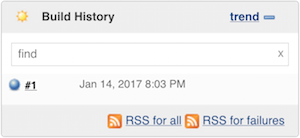
Aşağıda görüldüğü gibi eğer build #1'in "Console Output" seçeneğini seçerseniz, build hakkında çok önemli bilgilere ulaşabilirsiniz.
Nation-Merge
Bu testi yapabilmek için, "Build History" listesinden en azından bir tane build olması gerekli.
- Tarayıcıdan
http://localhost:8080adresine gidin. - Listeden "Nation-Merge" itemini seçin.
- Aşağıdakilerin herhangi birini yapın:
- "Rebuild Last" seçeneğini seçin.
- "Build Now" seçeneğini seçin.
Jenkins log aşağıdaki gibi görünecek.
$ tail -f /var/log/jenkins/jenkins.log

Jan 14, 2017 8:02:59 PM org.jenkinsci.plugins.ghprb.GhprbTrigger stop
INFO: Stopping the ghprb trigger for project Nation-Merge
Jan 14, 2017 8:02:59 PM org.jenkinsci.plugins.ghprb.GhprbTrigger start
INFO: Starting the ghprb trigger for the Nation-Merge job; newInstance is true
Jan 14, 2017 8:03:06 PM hudson.model.Run execute
INFO: Nation-Merge #1 main build action completed: SUCCESS
Aşağıda görüldüğü gibi eğer build #1'in "Console Output" seçeneğini seçerseniz, build hakkında çok önemli bilgilere ulaşabilirsiniz.
16. Jenkins GitHub pull request builder testi
Pull request yaratma
Yerel ortamda feature/update-gitignore isminde yeni bir tane branch yaratıp, remote GitHub kütüphanemize iletiyoruz. Jenkins build işlemini, biz pull request'i yarattıktan sonra çalıştırır, önce değil. Kısacası bizi bekler!
Yerel feature/update-gitignore branch'ı remote GitHub kütüphanemize ilettiğimizde, Jenkins log aşağıdaki gibi görünecek.
$ tail -f /var/log/jenkins/jenkins.log

Jan 14, 2017 8:20:38 PM org.jenkinsci.plugins.ghprb.GhprbRootAction handleAction
WARNING: Request not known for event: push
Jan 14, 2017 8:20:38 PM org.jenkinsci.plugins.github.webhook.subscriber.DefaultPushGHEventSubscriber onEvent
INFO: Received PushEvent for https://github.com/Inanzzz/nation
Jenkins feature/update-gitignore branch'ı için yaratılan testi başlatıp bitirdikten sonra, Jenkins log aşağıdaki gibi görünecek.
$ tail -f /var/log/jenkins/jenkins.log

Jan 14, 2017 8:21:35 PM org.jenkinsci.plugins.ghprb.GhprbRootAction handleAction
INFO: Checking PR #3 for Inanzzz/nation
Jan 14, 2017 8:21:35 PM org.jenkinsci.plugins.ghprb.GhprbTrigger handlePR
INFO: Checking PR #3 for job Nation
Jan 14, 2017 8:21:35 PM org.jenkinsci.plugins.ghprb.GhprbPullRequest
INFO: Created Pull Request #3 on Inanzzz/nation by Inanzzz () updated at: 1/14/17 8:35 PM SHA: 8f81f2b57df92b7ba0886e9f4ba3c8431b352581
Jan 14, 2017 8:21:35 PM org.jenkinsci.plugins.ghprb.GhprbPullRequest updatePR
INFO: Pull request #3 was updated on repo Inanzzz/nation but there aren't any new comments nor commits; that may mean that commit status was updated.
Jan 14, 2017 8:21:51 PM hudson.model.Run execute
INFO: Nation #3 main build action completed: SUCCESS
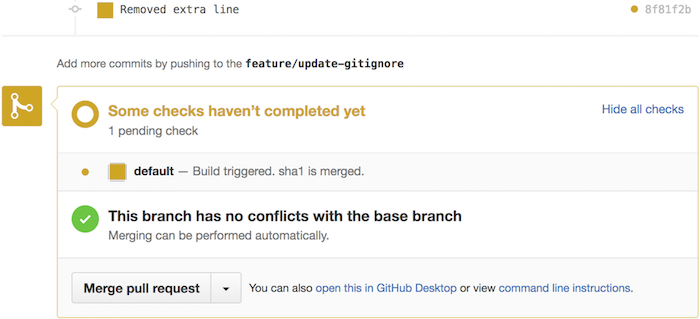
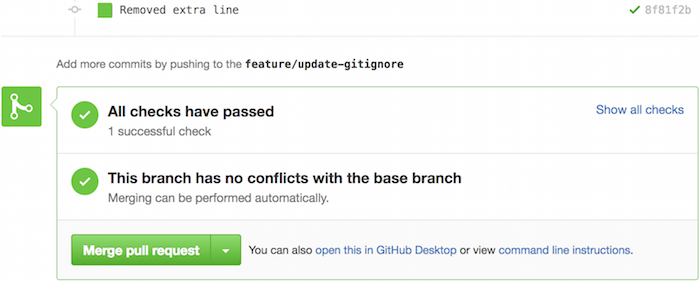
Eğer Jenkins GUI'ye giderseniz, build hakkında daha fazla bilgi görebilirsiniz.
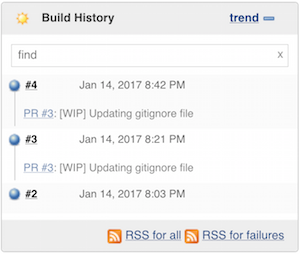
Test this please yorum komutu
Eğer pull request'e test this please yorumunu yazarsanız, Jenkins son çalıştırılan testi tekrar çalıştırır. Jenkins'in genel ayarlarındaki "GitHub Pull Request Builder" bölümünde veya burada diğer özel "yorum komutlarını" görebilirsiniz.
$ tail -f /var/log/jenkins/jenkins.log

Jan 14, 2017 8:42:16 PM org.jenkinsci.plugins.ghprb.GhprbRootAction handleAction
INFO: Checking issue comment 'test this please' for repo Inanzzz/nation
Jan 14, 2017 8:42:16 PM org.jenkinsci.plugins.ghprb.GhprbTrigger handleComment
INFO: Checking comment on PR #3 for job Nation
Jan 14, 2017 8:42:17 PM org.jenkinsci.plugins.ghprb.GhprbPullRequest updatePR
INFO: Pull request #3 was updated/initialized on Inanzzz/nation at 1/14/17 8:55 PM by Inanzzz (comment)
Jan 14, 2017 8:42:27 PM hudson.model.Run execute
INFO: Nation #4 main build action completed: SUCCESS

17. Jenkins GitHub merge builder testi
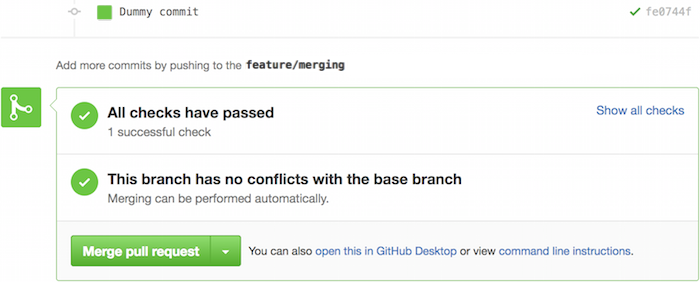
Burada elimizde mevcut olan feature/update-gitignore branch'ını kullanacağız yani hemen "Merge pull request" butonuna basabilirsiniz.
"Merge pull request" butonuna bastıktan sonra, Jenkins log aşağıdaki gibi görünecek.
$ tail -f /var/log/jenkins/jenkins.log

INFO: Received PushEvent for https://github.com/Inanzzz/nation
Jan 14, 2017 2:24:22 PM org.jenkinsci.plugins.github.webhook.subscriber.DefaultPushGHEventSubscriber$1 run
INFO: Poked Nation-Merge
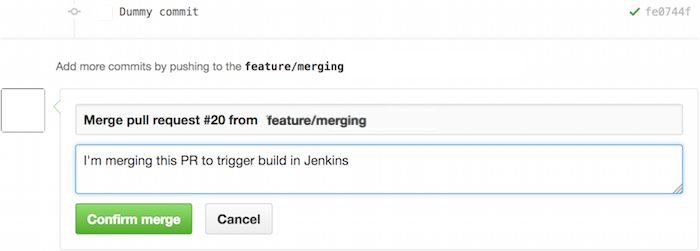
"Confirm merge" butonuna bastıktan sonra, Jenkins log aşağıdaki gibi görünecek.
$ tail -f /var/log/jenkins/jenkins.log

Jan 14, 2017 2:24:24 PM com.cloudbees.jenkins.GitHubPushTrigger$1 run
INFO: SCM changes detected in Nation-Merge. Triggering #9
Jan 14, 2017 2:24:35 PM hudson.model.Run execute
INFO: Nation-Merge#9 main build action completed: SUCCESS
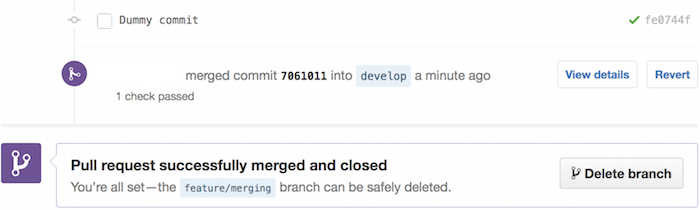
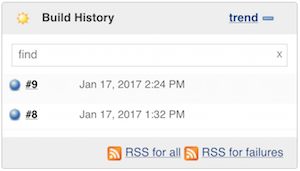
Eğer Jenkins GUI'ye giderseniz, build hakkında daha fazla bilgi görebilirsiniz.